---
title: Using documents to find opportunities before procurement
description: Use Stotles Document data to search for the earliest possible signs of an opportunity within the public sector.
---
[Skip to content](https://help.stotles.com/using-document-data-to-create-early-opportunities-before-procurement#main-content)
English
Show submenu for translations
Open main navigation
Close main navigation
- English
Show submenu for translations
Hello. How can we help you?
- There are no suggestions because the search field is empty.
1. [Stotles Help Centre](https://help.stotles.com/?hsLang=en)
2. [Build pipeline](https://help.stotles.com/build-pipeline?hsLang=en)
# Using documents to find opportunities before procurement
## Use Stotles Document data to search for the earliest possible signs of an opportunity within the public sector.
**Steps to use document data to find whitespace opportunities**
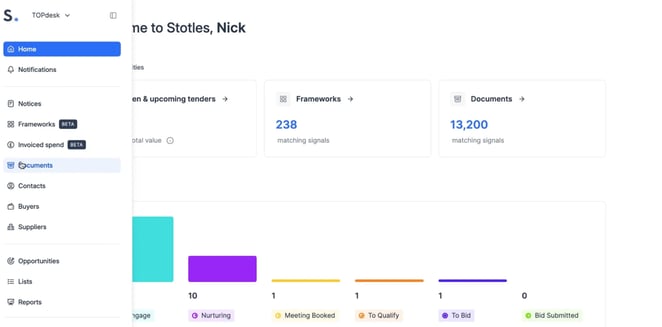
1. Using the vertical navigation, locate and click on the ‘**Documents**’ tab.
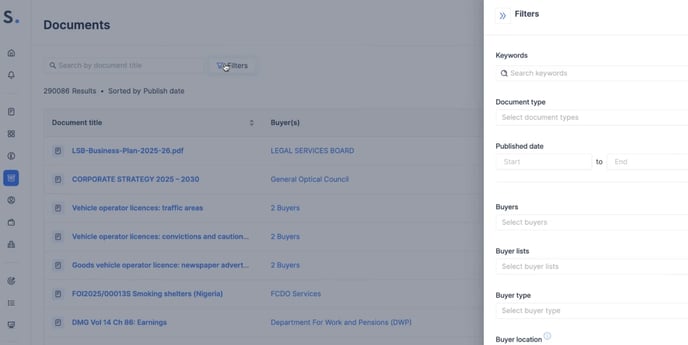
2. From the Documents tab, search using the ‘**Filter**’ button to filter by Keyword/Document type/Publish dates/Buyer characteristics to ensure the search is super relevant to you.
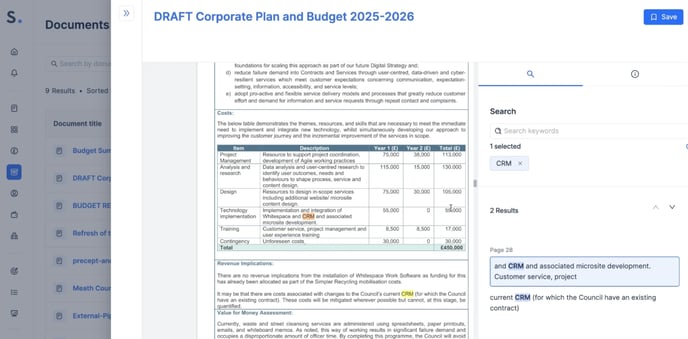
3. Once you have selected your chosen document, review the highlighted sections on the right-hand side.
- - You can use your chosen keywords to search through the document to look for relevant mentions that may indicate an early indication of interest in your chosen field.
4. If a relevant early buying signal is found, click ‘**Save**’ in the top right to create an opportunity.
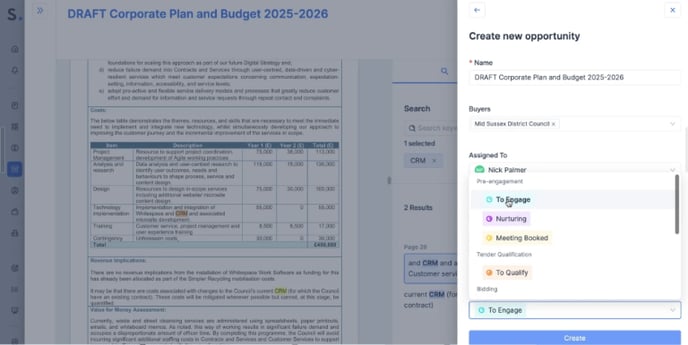
5. Complete the relevant details within the opportunity window on the right-hand side.
6. Click **'Create'** at the bottom of the window.
7. Once an opportunity is created, click the **View Opportunity pop-up** in the middle of your screen.
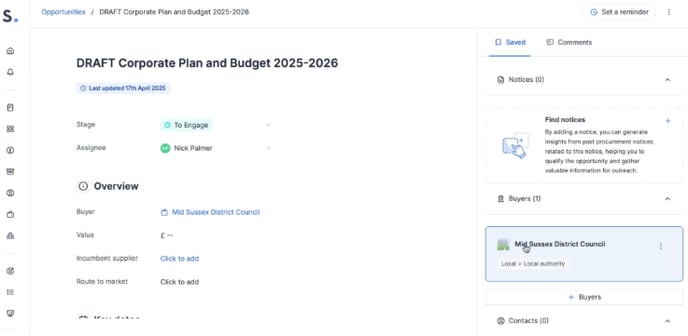
8. Add any further qualifying information and click save on the relevant Suppliers, Frameworks and Decision-maker contacts, which can be found within the opportunity page.
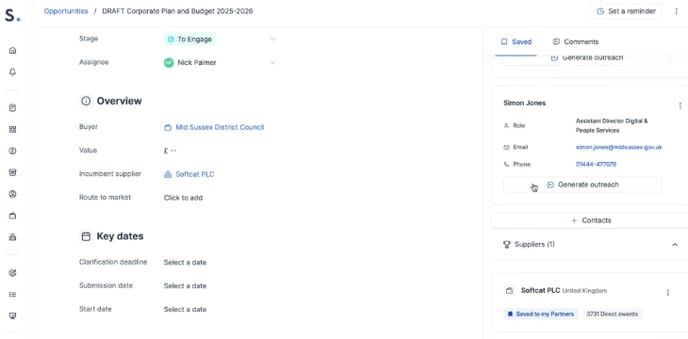
9. Now you have a qualified opportunity to collaborate with your team members.
- - Don't forget to reassign and update the stage of an opportunity once you have provided additional information and completed the qualification steps.
- [Create strategy](https://help.stotles.com/create-strategy?hsLang=en)
- [Build pipeline](https://help.stotles.com/build-pipeline?hsLang=en)
- [Track tenders](https://help.stotles.com/track-tenders?hsLang=en)
- [Win bids](https://help.stotles.com/win-bids?hsLang=en)
- [About Stotles](https://help.stotles.com/about-stotles?hsLang=en#main-content)
- [Our Features (Appendix)](https://help.stotles.com/about-stotles?hsLang=en#our-features-appendix)
- [Stotles Playbooks](https://help.stotles.com/stotles-playbooks?hsLang=en#main-content)
- [Stotles for Business Development Reps (BDRs)](https://help.stotles.com/stotles-playbooks?hsLang=en#stotles-for-business-development-reps-bdrs)
- [Stotles for Account Executives (AEs)](https://help.stotles.com/stotles-playbooks?hsLang=en#stotles-for-account-executives-aes)
- [FAQs](https://help.stotles.com/faqs?hsLang=en#main-content)
- [How to set up your Stotles account for success](https://help.stotles.com/faqs?hsLang=en#how-to-set-up-your-stotles-account-for-success)
- [How to Build Pipeline with Opportunities](https://help.stotles.com/faqs?hsLang=en#how-to-build-pipeline-with-opportunities)
- [How to Pre-Engage with Early Buying Signals](https://help.stotles.com/faqs?hsLang=en#how-to-pre-engage-with-early-buying-signals)
- [How to research and track key public sector buyers](https://help.stotles.com/faqs?hsLang=en#how-to-research-and-track-key-public-sector-buyers)
- [How to utilise decision maker contact information](https://help.stotles.com/faqs?hsLang=en#how-to-utilise-decision-maker-contact-information)
- [How to track your partners and competitors](https://help.stotles.com/faqs?hsLang=en#how-to-track-your-partners-and-competitors)
- [Expert Services](https://help.stotles.com/faqs?hsLang=en#expert-services)
- [Licencing and Team Management](https://help.stotles.com/faqs?hsLang=en#licencing-and-team-management)
- [CRM integrations](https://help.stotles.com/faqs?hsLang=en#crm-integrations)
- [Teams and Slack integrations](https://help.stotles.com/faqs?hsLang=en#teams-and-slack-integrations)
- [About us](https://www.stotles.com/about-us/)
- [Sign in](https://app.stotles.com/users/sign_in)
[](http://www.stotles.com)
Copyright © 2026, Stotles